Prestige Casino mobile: browser play rather than a native app
 Available in GB
Mobile access
No dedicated native Prestige Casino iOS or Android app is established. What is consistently supported is browser-based mobile access: the casino can be reached through a phone or tablet browser without installing a separate app. For a UK reader searching for a “Prestige Casino app”, the practical answer is therefore to treat the mobile website as the main access route rather than looking for an APK or an app-store download.
That distinction is important because search results around casino brands can include unofficial download pages, old domains and lookalike sites. The current brand is associated with casinoprestige.com, so domain verification should come before login or entering payment information. Once on the correct site, the useful mobile checks are simple: confirm that the games you want open in-browser, that the live-casino section is usable on your device, and that account or cashier tasks are available from the same mobile session.
Table of Contents
- Is there a Prestige Casino app for iPhone or Android?
- Why browser access is not the same as a native casino app
- What to check before using Prestige on a phone
- Mobile games and live casino
- Do you need an APK, shortcut or home-screen icon?
- How mobile access connects to account and payment tasks
- When the browser-first setup is useful – and when to verify more
- Why Prestige works as a mobile website rather than an app
- Browser access keeps the account in one place across devices
- Use browser controls deliberately on a casino session
- Recommend
Is there a Prestige Casino app for iPhone or Android?
No dedicated native iOS or Android app is established for Casino Prestige; mobile access is browser-based. That means the mobile experience should be assessed as a responsive website, not as a separate product installed from Apple’s App Store or Google Play.
There is no need to provide APK instructions. An APK file found through a third-party download page is not the same thing as an official Android application. Unless the operator itself provides a current, verifiable app-store listing or official download path, installing a file from an unrelated domain adds avoidable uncertainty.
For iPhone users, the same principle applies. A search result using the brand name is not proof of an official app. Safari or another standard browser is the normal route to Prestige on iOS.
Why browser access is not the same as a native casino app
A native app is software installed on the device and distributed through an app store or another official operator-controlled channel. A responsive casino website runs inside the browser and adapts its layout to the screen. Both can feel similar once opened, but they have different installation, update and verification paths.
| Question | Native app | Prestige mobile browser |
|---|---|---|
| Install required? | Usually yes. | No separate install is required. |
| Where updates happen | Through the app distribution channel. | Changes appear on the website. |
| How to verify access | Confirm the official app listing and stateer. | Confirm the canonical web domain before login. |
| Current Prestige status | No dedicated native app established. | Browser-based mobile access is supported. |
For most practical tasks, this means there is no reason to search for a download before checking the website itself. If a mobile feature is available through the responsive site, it can be used without adding another installed application to the device.
What to check before using Prestige on a phone
1. Confirm the domain before signing in
Search results can surface lookalike pages, reviews and domains that use similar naming, so a mobile login should begin by confirming the current official Prestige domain rather than using whichever result appears first.
This is especially relevant on smaller screens, where the full URL can be less visible. Expand the address bar and inspect the hostname before entering credentials or financial information.
2. Check the actual lobby you want to use
Casino Prestige is described to offer slots and live-casino content. If a specific title or live table is important to you, verify it in the current mobile lobby rather than assuming the desktop catalogue and mobile catalogue are identical in every detail.
The broader Prestige Casino games explains which parts of the library are strongly supported by current information and where exact catalogue claims remain too unstable to state.
3. Test account and cashier navigation
A mobile casino is most useful when routine account tasks remain accessible without switching devices. Before relying on a phone as your main access method, check that you can reach the account area and the relevant cashier screens from the same browser session.
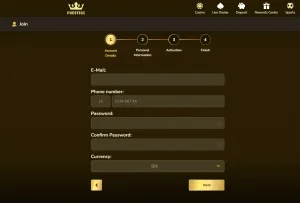
If registration or identity verification becomes relevant, the Prestige Casino registration explains the account setup and identity-check process.
Mobile games and live casino
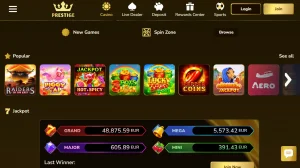
Casino Prestige includes slots and live-casino content and supports browser-based mobile access. Use the mobile lobby to check the titles or tables you want, because desktop and mobile availability can differ.
Do not assume that all games work on mobile or that the mobile catalogue is identical to desktop. Those are performance and inventory claims that require a live device-level check. The stronger practical approach is to open the category you care about, confirm the exact game or table, and only then decide whether the browser experience meets your needs.
If dealer-led play is your priority, see the Prestige live casino. It keeps table-specific claims separate from the broader mobile question.
Do you need an APK, shortcut or home-screen icon?
You do not need an APK to use the official browser-based route. Android browsers can access the site directly, and iPhone browsers can do the same. Some browsers allow a website shortcut to be added to the home screen, but that shortcut remains a link to the website rather than proof of a native Prestige application.
The difference matters when evaluating search results. A page that says “download Prestige Casino APK” is making a stronger claim than can be safely established. Third-party APK repositories and unofficial app pages should be avoided.
If the operator later statees a clearly official app, the relevant verification points would be the stateer identity, the operator-controlled link to the store listing and a current listing on the store itself. Until then, browser access is the practical path.
How mobile access connects to account and payment tasks
Mobile access is not only about opening games. For many users, the more important question is whether the account area remains practical on a phone when they need to review profile details, use the cashier or respond to a verification request.
Mobile browser access does not imply a specific withdrawal time, fee or account-processing speed. Those details can vary. For a more focused look at cashier routes, use the Prestige Casino payments guide.
If identity verification is requested, keep the task within the confirmed brand domain and follow the instructions shown in the account. The exact document list and processing time are not fixed in the live account, so a third-party checklist should not be treated as authoritative.
When the browser-first setup is useful – and when to verify more
The browser-first setup removes one friction point: there is no established native app that a reader needs to find and install before reaching the casino. It also means the website itself is the central point of access across devices.
What it does not do is guarantee identical behaviour on every phone, browser or connection. If your decision depends on a specific game, a live table, a cashier control or an account feature, verify that function on the device you intend to use. This is more useful than relying on generic claims about mobile optimisation.
For the broad UK-facing context around the brand, including the distinction between operational access and regulatory status, return to the Prestige Casino UK review.
Why Prestige works as a mobile website rather than an app
The clearest current answer is that Casino Prestige supports browser-based mobile play while no dedicated native iOS or Android app is established. That makes the mobile website the relevant product to assess.
Confirm the current official domain, avoid unofficial APK or app-download pages, and test the games and account tasks that matter to you in the browser. That resolves the app-versus-browser question without relying on an unofficial download.
Browser access keeps the account in one place across devices
Using the website in a mobile browser means the same account area can be reached without installing separate casino software. That is useful when you want to move between a phone, tablet and desktop while keeping registration, cashier and game access tied to the same account. Sign in only after checking the current official address, especially when opening the site from a search result or saved shortcut.
For routine use, test the tasks that matter most to you: opening the game lobby, reaching live casino, finding the cashier and locating account settings. If one of those controls is difficult to use on a particular device, switch browser or device rather than assuming a dedicated app is required.
Use browser controls deliberately on a casino session
Keep the address bar available when signing in, avoid saving a casino password on a shared device, and close the session when the phone or tablet is not exclusively yours. These are ordinary browser habits, but they matter more when the same session can reach account details and the cashier.